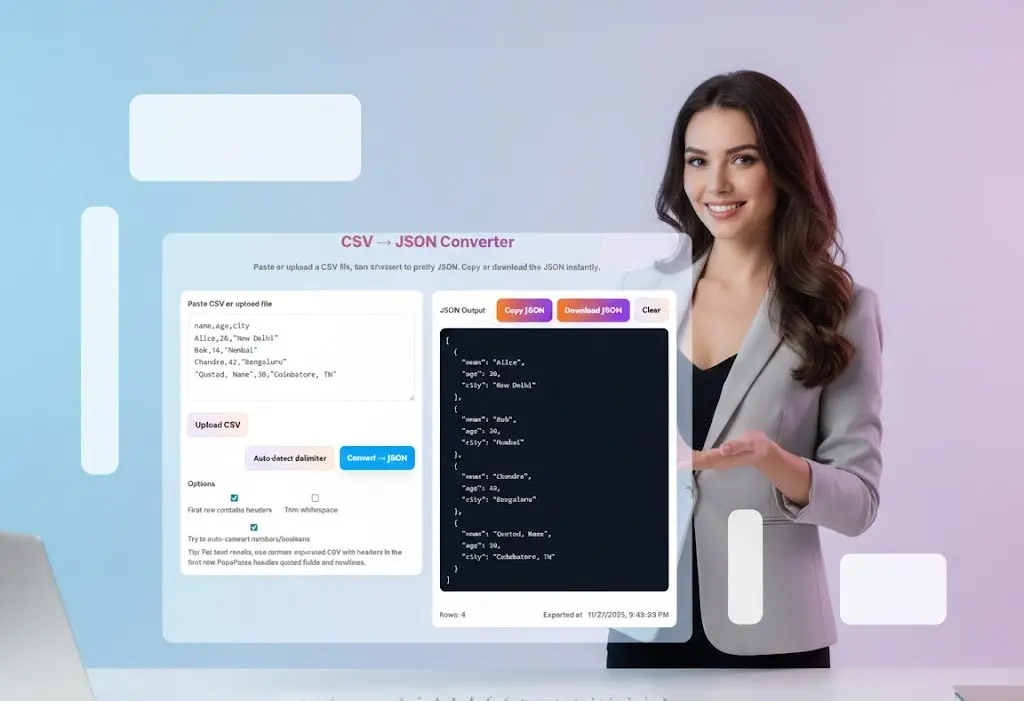
CSV to JSON Converter – Free Online Tool for Fast & Accurate Conversion
Need JSON for APIs or automation? Our CSV to JSON Converter lets you convert CSV to formatted JSON in seconds—secure, private, and browser-based.
What is CSV to JSON Converter?
CSV (Comma Separated Values) files contain tabular data stored in plain text. They are lightweight, easy to read, and widely used for spreadsheets, exports from accounting systems, CRM tools, HRMS data, POS systems, and database dumps.
JSON (JavaScript Object Notation) is a structured data format used in APIs, NoSQL databases, web apps, and backend integrations. JSON is clean, hierarchical, and machine-readable.
CSV to JSON converter transforms each row of CSV data into a structured JSON object or array—making it easier for developers, analysts, and automation tools to consume and process the data in modern applications.
Why Use Our Free Online CSV to JSON Converter?
Our CSV to JSON Converter is engineered for simplicity and accuracy. You don’t need coding knowledge, external software, or complex desktop tools. Everything happens instantly inside your browser.
Key benefits:
- ✔ Free and unlimited usage
- ✔ No file upload – works entirely in your browser
- ✔ Supports headers, auto-detect delimiter, and quoted fields
- ✔ Converts numbers, booleans, and strings accurately
- ✔ JSON output is pretty-printed and easy to read
- ✔ Copy JSON or download the file instantly
- ✔ Clean, modern, gradient UI with zero clutter
- ✔ Mobile-friendly and fully responsive
Designed for professionals who want reliability and for beginners who want simplicity.
How to Use the CSV to JSON Converter (Step-by-Step Guide)
Using the tool is extremely simple and takes only a few seconds.
Step 1: Paste or Upload Your CSV File
Copy your CSV data and paste it into the input box.
OR click Upload CSV to select a .csv file from your device.
Step 2: Check Your Options
You can toggle options such as:
- First row contains headers (recommended)
- Trim whitespace
- Auto-detect numbers/booleans
- Auto-detect delimiter (comma, tab, semicolon, pipe)
Step 3: Click “Convert → JSON”
The tool instantly processes your CSV and generates clean, formatted JSON.
Step 4: Copy or Download
You can:
- Click Copy JSON
- Click Download JSON
That’s it! Your CSV is now converted into valid JSON.
Who Can Use This CSV to JSON Tool?
This tool is designed for a wide variety of use cases:
1. Developers
Convert CSV exports into JSON for APIs, mock data, testing, and backend development.
2. Data Analysts
Clean, structure, and prepare CSV datasets for dashboards or automation.
3. Accountants & Finance Professionals
Convert Excel/CSV ledger data, salary sheets, invoice rows, or MIS exports into JSON for analytics tools.
4. Students & Professionals
Learn about structured data conversion without writing code.
5. Automation & AI Workflows
Use the converted JSON for Zapier, Make.com, RPA tools, or AI prompt engineering.
Top Features That Make This Tool Stand Out
✓ Auto-Detect Delimiter
Many CSV files use tabs, semicolons, or pipes. The tool intelligently identifies the correct delimiter.
✓ JSON Pretty Formatter
Readable indentation, clean structure, and zero errors.
✓ Smart Type Conversion
Automatically converts:
"42"→ 42"true"→ true"false"→ false
✓ Handles Complex CSV
Works with:
- Quoted fields
- Newline characters
- Commas inside text
- Unicode text
- Special characters
✓ Client-Side Processing
Nothing is uploaded to any server—your data stays private.
Common CSV Errors & How This Tool Helps
1. Misaligned Columns
Some CSV files have an extra comma or missing value.
Our parser stabilizes the rows and handles empty fields gracefully.
2. Missing Headers
If your CSV doesn’t include column names, the tool still converts it into a JSON array.
3. Large Data Rows
The tool performs fast parsing even for lengthy rows and large datasets.
4. Special Characters
CSV fields with quotes, commas, or line breaks are escaped properly using industry-grade parsing.
Why JSON is Better for Modern Use Cases
Developers prefer JSON because it:
- Works seamlessly with JavaScript & APIs
- Supports nested objects and arrays
- Is accepted by almost every modern software
- Integrates well with databases like MongoDB, Firestore, and ElasticSearch
- Powers AI workflows and microservices
JSON is lighter, faster, and more understandable than traditional formats.

Frequently Asked Questions
1. Is this CSV to JSON Converter free?
Yes. It is 100% free and unlimited.
2. Is my data stored or uploaded?
No. Everything runs in your browser—you have complete privacy.
3. Can I convert very large CSV files?
Yes, as long as your browser can handle the memory.
4. Does it support complex CSV files?
Absolutely. It handles quotes, escaped characters, tabs, semicolons, and irregular delimiters.
Conclusion
The CSV to JSON Converter by Toolsuite.in is designed to simplify a common but important workflow. With a beautiful interface, instant conversion engine, and complete privacy, it offers a reliable solution for professionals and beginners alike. Whether you’re preparing API data, cleaning a spreadsheet, or building an automation workflow, this fast and accurate tool ensures an effortless conversion experience every time.
If you’re looking for the best free CSV to JSON converter online, this is the perfect tool to bookmark and use every day.
Related Tools and Directory
- Income Tax Calculator
- Tools Directory Overview
- Free Online tools Hub
- Finance & Tax Tools Hub
- Advance Tax Interest Calculator
- GST Calculator
- HRA Exemption Calculator
- TDS Deduction Estimator — Salary (Monthly Estimate)
- Income Tax Slab Comparison
- Gratuity Calculator
- EPF Contribution Calculator
- Simple EMI Calculator
- Advance Term Loan EMI Calculator
- Car Loan EMI Calculator
- Personal Loan EMI Calculator
- Home Loan EMi Calculator
- SIP Calculator
- SIP Goal Calculator
- CAGR Calculator
- XIRR Calculator
- SWP Calculator
- STP Calculator
- Free Lumpsum Investment Calculator: Maximize the Future Value
- Explore more tools for Finance & Tax and SEO on TaxBizmantra.com & CAMSROY.COM