Transform Your Email Marketing with AI-Powered Email Subject Line Generator
Email marketing remains one of the most effective digital marketing channels, but your campaign’s success hinges on one critical element: the subject line. Our Email Subject Line Generator helps marketers, business owners, and content creators craft compelling, high-converting subject lines that capture attention and drive opens. This free, browser-based tool combines proven copywriting principles with AI assistance to generate multiple subject line variations tailored to your specific campaign needs.
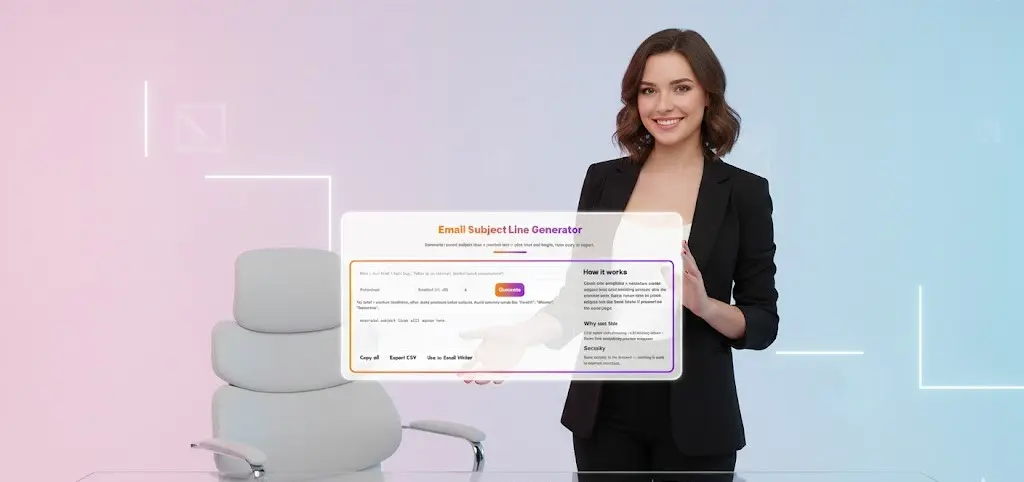
Email Subject Line Generator
Generate tested subject lines + preview text — pick tone and length, then copy or export.
How it works
Client-side templates + variations create subject lines and matching preview text. No external calls. Quick-insert tries to paste subject into the Email Writer if present on the same page.
What Is an Email Subject Line Generator?
An email subject line generator is a specialized tool designed to create attention-grabbing, relevant subject lines for email campaigns. Unlike generic text generators, our tool focuses specifically on email marketing best practices, incorporating factors like optimal character length, tone customization, and preview text generation. The tool creates multiple variations instantly, allowing you to A/B test different approaches and find what resonates best with your audience.
Our generator runs entirely in your browser, ensuring complete privacy and security. No data is sent to external servers, and you maintain full control over your campaign information. Whether you’re announcing a product launch, following up on interviews, sending newsletters, or running promotional campaigns, this tool adapts to your specific context.
Why Email Subject Lines Matter for Open Rates
The subject line is the first—and sometimes only—impression your email makes. Statistics show that 47% of email recipients decide whether to open an email based solely on the subject line. A well-crafted subject line can increase open rates by 20-50%, directly impacting your campaign ROI.
Poor subject lines result in low engagement, wasted marketing spend, and potential deliverability issues. Spam filters scrutinize subject lines, and subscribers quickly unsubscribe from emails that consistently fail to deliver value. Our email subject line tool helps you avoid common pitfalls like spam trigger words, excessive punctuation, and misleading claims that damage sender reputation.
How Our Subject Line Generator Works
Our tool uses a sophisticated client-side algorithm that combines your input with proven email marketing templates. Here’s the process:
1. Input Your Brief: Enter a short description of your email’s purpose, including context like audience, offer, or key message. More detailed briefs produce better results. For example, instead of “newsletter,” try “monthly tech newsletter featuring new AI tools for marketers.”
2. Select Your Tone: Choose from professional, casual, friendly, urgent, or other tones that match your brand voice and campaign objective. The tone dramatically affects how recipients perceive your message.
3. Set Character Length: Select standard (41-60 characters), short, or long formats. Mobile devices display approximately 30-40 characters, while desktop email clients show up to 60 characters. Our generator optimizes for maximum visibility across devices.
4. Generate Variations: The tool creates multiple subject line options simultaneously, giving you immediate A/B testing candidates. Each variation follows different psychological triggers—curiosity, urgency, benefit-driven, question-based, or personalized approaches.
5. Preview and Refine: Review generated subject lines alongside preview text snippets. This combination shows how your email appears in recipients’ inboxes, helping you make informed decisions about which version to test.
Key Features That Maximize Your Email Performance
Client-Side Processing: All generation happens in your browser, ensuring your campaign details remain confidential. No external API calls mean faster generation and complete data privacy.
Multiple Variations: Generate 6-10 subject line options per request, providing diverse approaches for comprehensive A/B testing. Testing multiple subject lines helps identify what truly resonates with your specific audience.
Preview Text Generation: Beyond subject lines, our tool creates matching preview text that complements your subject line. This preview text (also called preheader text) appears next to the subject line in most email clients, giving you additional space to entice opens.
Character Count Optimization: The tool automatically ensures subject lines fit within optimal length parameters, preventing truncation on mobile devices where most emails are first viewed.
Tone Customization: Match your brand voice with adjustable tone settings. Professional tone works for B2B communications, while casual or friendly tones suit lifestyle brands and B2C campaigns.
Export Options: Copy all variations to your clipboard, export to CSV for tracking, or quickly insert into email marketing platforms. Streamlined workflow integration saves time and reduces manual copying errors.
Best Practices for Crafting Effective Subject Lines
While our generator provides excellent starting points, understanding email subject line best practices helps you refine results:
Be Specific: Vague subject lines like “Check this out” perform poorly. Specific subjects like “Q3 Sales Report: Revenue Up 23%” immediately communicate value.
Create Urgency (When Appropriate): Time-sensitive offers benefit from urgency, but overuse diminishes effectiveness. Use phrases like “Last chance” or “Ending tonight” sparingly and genuinely.
Personalization Works: Subject lines with recipient names or personalized details generate 26% higher open rates. Our generator accommodates personalization tokens for integration with your email platform.
Ask Questions: Question-based subject lines engage curiosity and prompt opens. “Ready to boost your productivity?” performs better than “Productivity tools inside.”
Test Everything: What works for one audience may fail with another. Consistent A/B testing using our multiple variations helps you understand your specific subscribers’ preferences.
Avoid Spam Triggers: Words like “FREE!!!”, “Guarantee,” “Winner,” or excessive punctuation trigger spam filters. Our tool avoids these problematic patterns automatically.
Industries and Use Cases
Our email subject line generator serves diverse industries and scenarios:
E-commerce: Product launches, abandoned cart reminders, seasonal promotions, customer appreciation emails, new arrival announcements.
B2B Marketing: Webinar invitations, whitepaper downloads, case study sharing, partnership proposals, follow-up communications.
Content Marketing: Newsletter announcements, blog post notifications, resource library updates, content series launches.
Human Resources: Interview follow-ups, candidate outreach, employee newsletters, company announcements, recruitment campaigns.
Event Marketing: Conference invitations, ticket sales, speaker announcements, last-minute registrations, post-event follow-ups.
Non-Profit Organizations: Fundraising campaigns, volunteer recruitment, impact reports, event invitations, donor acknowledgments.
Optimizing for Mobile Email Opens
Over 60% of emails are opened on mobile devices, making mobile optimization crucial. Our generator considers mobile constraints:
Shorter Subject Lines: Mobile devices display fewer characters. The tool prioritizes front-loading important information in the first 30 characters.
Action-Oriented Language: Mobile users make quick decisions. Subject lines with clear benefits or actions perform best.
Emoji Testing: While not generated by default, the tool’s preview function helps you test how emojis appear across devices when you add them manually.
Integration with Your Email Marketing Workflow
The Email Subject Line Generator integrates seamlessly into existing workflows:
Quick Copy Function: One-click copying of all generated variations lets you paste directly into your email marketing platform’s A/B testing interface.
CSV Export: Export all variations with associated metrics for tracking performance across campaigns. Build a knowledge base of what works for your audience.
Email Writer Integration: If using the Email Writer tool, generated subject lines can be quickly inserted, maintaining consistency between subject line and email body.
Measuring Subject Line Success
Generating great subject lines is just the beginning. Track these metrics to measure effectiveness:
Open Rate: The primary indicator of subject line performance. Industry averages range from 15-25%, though this varies significantly by sector and list quality.
Click-Through Rate: Measures how many opens lead to clicks. This indicates alignment between subject line promise and email content.
Conversion Rate: Ultimately, emails should drive actions. Track how different subject lines impact downstream conversions.
Unsubscribe Rate: Misleading subject lines spike unsubscribes. Maintain trust by ensuring subject lines accurately reflect email content.
Spam Complaint Rate: High complaints damage sender reputation. Monitor which subject line styles trigger complaints.
Advanced Subject Line Strategies
Beyond basics, consider these advanced approaches:
Seasonal Relevance: Timing matters. Subject lines referencing current events, holidays, or seasons feel more relevant and timely.
Exclusivity Angle: “Members only,” “Early access,” or “Invitation only” create perceived value and encourage opens.
Curiosity Gaps: Create intrigue without clickbait. “The one metric we stopped tracking” prompts curiosity while remaining honest.
Social Proof: “10,000+ marketers downloaded this guide” leverages peer influence to build credibility.
Problem-Solution Framework: Address pain points directly. “Struggling with low email opens? Try this” speaks to specific challenges.

Frequently Asked Questions (FAQ)
Q: What makes a good email subject line?
A: A good email subject line is concise (typically 41-60 characters), relevant to the recipient, creates curiosity or urgency, accurately reflects the email content, and avoids spam trigger words. The best subject lines are personalized, specific, and provide clear value. Our email subject line generator incorporates these principles automatically, creating variations that follow proven best practices while adapting to your specific campaign context.
Q: How many subject line variations should I test?
A: For basic A/B testing, test 2-3 variations at a time to get statistically significant results. Our generator provides 6+ options, allowing you to select the most promising candidates for testing. Once you identify patterns that work with your audience, you can refine future campaigns based on those insights. Large lists (100,000+ subscribers) can test more variations simultaneously with adequate sample sizes.
Q: Is this email subject line generator really free?
A: Yes, our email subject line generator is completely free to use with no hidden costs, subscriptions, or limits on generations. The tool runs entirely in your browser without requiring account creation or payment information. You can generate unlimited subject lines, export results, and use them in any email marketing platform without restrictions.
Q: Does the generator work for all types of emails?
A: Absolutely. Our email subject line tool works for newsletters, promotional campaigns, transactional emails, follow-up messages, event invitations, product launches, and any other email type. You simply adjust the brief and tone settings to match your specific email purpose. The more context you provide in your brief, the more targeted and effective the generated subject lines will be.
Q: How does the tool ensure my data stays private?
A: Our generator processes everything client-side in your browser. No information you enter is sent to external servers or stored anywhere outside your device. This approach ensures complete privacy and security for sensitive campaign information. You maintain full control over your data, and nothing is tracked, logged, or shared.
Q: Can I use these subject lines for commercial purposes?
A: Yes, all subject lines generated by this tool are free to use for personal or commercial purposes without attribution. You own the output and can use it in your email marketing campaigns, test it with your audience, and modify it as needed. We encourage you to test and refine generated subject lines to match your specific brand voice and audience preferences.
Q: What character length works best for subject lines?
A: The optimal length is 41-60 characters for desktop visibility while remaining effective on mobile devices (which typically show 30-40 characters). Our generator defaults to this standard range but offers shorter options for mobile-first audiences and longer options when additional context is valuable. Front-load the most important information in the first 30 characters regardless of total length.
Q: How can I improve my email open rates beyond subject lines?
A: While subject lines significantly impact open rates, also focus on sender name recognition (use a consistent, recognizable sender name), sending time optimization (test different days and times), list segmentation (send relevant content to appropriate segments), preview text quality (complement your subject line), and maintaining list hygiene (remove inactive subscribers). Our tool generates preview text alongside subject lines to optimize both elements simultaneously.
Q: Should I use emojis in my email subject lines?
A: Emojis can increase open rates by 10-15% when used appropriately, but effectiveness varies by industry and audience. B2C and lifestyle brands often benefit from emoji use, while B2B and professional services should use them sparingly. Test emoji usage with your specific audience. While our generator doesn’t automatically add emojis, you can manually insert them and use the preview function to see how they appear.
Q: How often should I change my email subject line strategy?
A: Continuously test and refine your approach based on performance data. Audiences evolve, and what worked six months ago may lose effectiveness. Run A/B tests on every major campaign, analyze results monthly, and adjust your strategy quarterly. Our generator makes it easy to experiment with new approaches by providing diverse variations instantly, supporting an iterative optimization process.
Related Tools and Directory
- Income Tax Calculator
- Tools Directory Overview
- Free Online tools Hub
- Advance Tax Interest Calculator
- GST Calculator
- HRA Exemption Calculator
- TDS Deduction Estimator — Salary (Monthly Estimate)
- Income Tax Slab Comparison
- Gratuity Calculator
- EPF Contribution Calculator
- Simple EMI Calculator
- Advance Term Loan EMI Calculator
- Car Loan EMI Calculator
- Personal Loan EMI Calculator
- Home Loan EMi Calculator
- SIP Calculator
- SIP Goal Calculator
- CAGR Calculator
- XIRR Calculator
- SWP Calculator
- STP Calculator
- Free Lumpsum Investment Calculator: Maximize the Future Value
- CSV to JSON Converter
- QR Code Generator
- CSV to Excel Converter
- Base64 Encoder/Decoder
- Regex Tester
- JSON Formatter & Validator
- UUID Generator
- Strong Password Generator
- Lorem Ipsum Generator
- URL Encoder & Decoder
- HTML escape-unescaped tools
- JPG to PDF Converter
- PDF to JPG Converter
- PDF Compressor
- PDF Merge
- Case Converter
- Break-Even Calculator
- ROI Calculator
- Free Profit Margin Calculator – Calculate Profit Margins Instantly
- Startup Runway & Burn Rate Calculator – Calculate Cash Runway Free
- Free Working Capital Calculator | Free Tool- ToolSuite.in
- Vendor Payment Terms Calculator | APR & Discount Analyzer Free
- Simple Cap Table Builder | Free Equity & Ownership Calculator
- AI Email Writer – Free Online Email Generator for Emails
- AI Email Rewriter – Free Smart Email Assistant-Toolsuite
- Meeting Notes Summarizer – Free Tool to Summarize Meetings
- Free AI Message Polisher – Rewrite Messages in Formal, Friendly
- Daily Work Summary Generator | Free EOD Report & Manager Update Tool
- Document Bullet Extractor Free | Extract Key Points From Text
- Explore more tools for Finance & Tax and SEO on TaxBizmantra.com & CAMSROY.COM