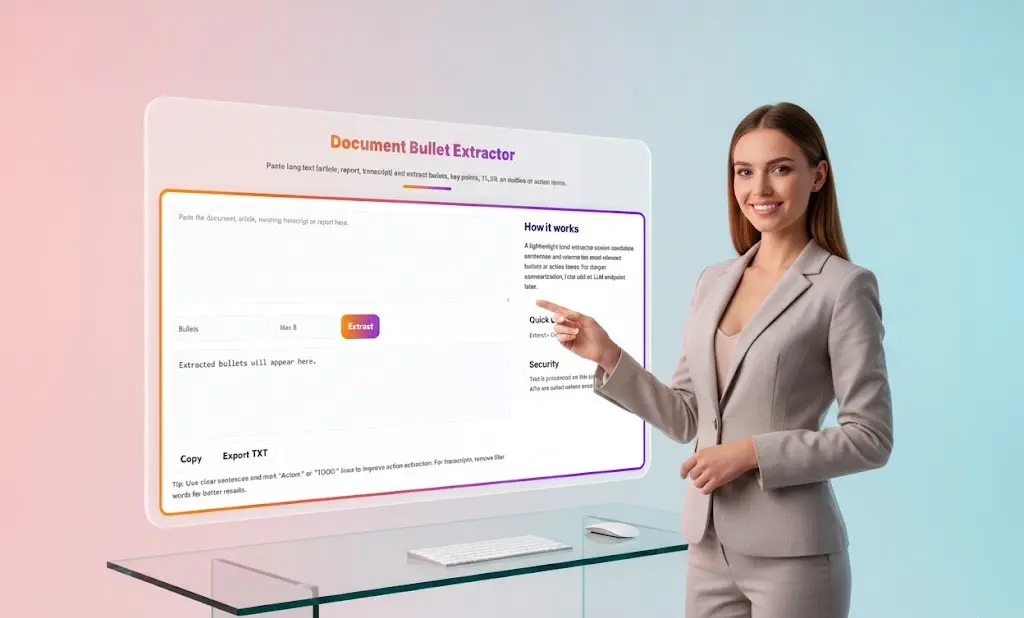
Document Bullet Extractor: Transform Long Documents Into Actionable Key Points
In an era of information overload, extracting actionable insights from lengthy documents, reports, and transcripts has become a critical skill. Our Document Bullet Extractor is designed to solve this challenge by automatically identifying and extracting the most important bullets, key points, action items, and creating concise TL;DR summaries from any text you provide.
Document Bullet Extractor
Paste long text (article, report, transcript) and extract bullets, key points, TL;DR, an outline or action items.
How it works
A lightweight local extractor scores candidate sentences and returns the most relevant bullets or action items. For deeper summarization, I can add an LLM endpoint later.
What Is a Document Bullet Extractor?
A Document Bullet Extractor is an intelligent text analysis tool that processes long-form content and identifies the most relevant information based on content structure, keyword density, and contextual importance. Unlike simple text summarizers that reduce content proportionally, our extractor specifically targets:
- Bullet points and list items that represent key information
- Action items marked with indicators like “Action:”, “TODO:”, or assignee names
- Key points that represent main ideas and critical takeaways
- TL;DR content (Too Long; Didn’t Read) for executive summaries
- Document outlines that structure information hierarchically
The tool uses a lightweight local extraction algorithm that scores candidate sentences based on relevance, returning only the most important information without requiring cloud processing or API calls.
How the Document Bullet Extractor Works
Our extraction process is designed for speed, accuracy, and privacy:
1. Input Your Document
Paste any long-form text into the input field:
- Meeting transcripts and minutes
- Research articles and white papers
- Business reports and proposals
- Email threads and correspondence
- Conference notes and presentations
- Technical documentation
- Interview transcripts
- Project specifications
The tool accepts unformatted plain text from any source, making it universally compatible with your existing workflows.
2. Select Extraction Type
Choose what you want to extract:
- Bullets: Existing bullet points and list items
- Key Points: Main ideas and critical information
- Action Items: Tasks requiring follow-up
- TL;DR: Ultra-concise summary
- Outline: Structured document overview
3. Set Maximum Results
Control the level of detail by specifying how many items to extract (typically 5-20). This flexibility allows you to create everything from executive summaries to comprehensive breakdowns.
4. Intelligent Extraction
Our local algorithm analyzes your document by:
- Identifying sentence importance through linguistic patterns
- Recognizing explicit markers (bullets, numbers, action indicators)
- Scoring content based on information density
- Filtering redundant or low-value statements
- Prioritizing actionable and specific content
5. Export Your Results
Review extracted content in the preview area, then copy to clipboard or export as a TXT file for easy integration into your workflow.
Key Features That Make Us Different
Lightning-Fast Local Processing
Unlike cloud-based tools that require uploading documents and waiting for API responses, our extractor processes everything locally in your browser. Most documents are analyzed in under 2 seconds, regardless of length.
Privacy-First Architecture
Your documents never leave your device. All text analysis happens client-side, ensuring sensitive business information, confidential meeting notes, and proprietary content remain completely private. No data is stored, logged, or transmitted.
Intelligent Action Item Detection
The tool excels at identifying action items by recognizing common patterns:
- Lines beginning with “Action:”, “TODO:”, “TASK:”
- Names in parentheses indicating assignees (e.g., “Follow up with client (Sarah)”)
- Imperative verb phrases (“Schedule”, “Complete”, “Review”)
- Deadline indicators (“by Friday”, “end of week”)
Customizable Extraction Depth
Unlike fixed summarization tools, you control the granularity. Extract 3 bullets for a quick overview or 20+ for comprehensive coverage. This flexibility adapts to your specific needs.
Format-Agnostic Processing
The tool works with any text format—whether your source document uses bullets, numbered lists, paragraphs, or mixed formats. It intelligently identifies key content regardless of original structure.

Who Benefits from the Document Bullet Extractor?
Business Professionals
Quickly extract action items from long email threads and meeting notes. Prepare for meetings by reviewing key points from previous discussions in seconds rather than re-reading entire transcripts.
Researchers and Academics
Process research papers and articles efficiently. Extract key findings, methodologies, and conclusions without reading entire studies. Perfect for literature reviews and research synthesis.
Content Creators and Writers
Analyze competitor content and extract main themes. Convert long-form source material into organized notes and outlines for your own writing projects.
Project Managers
Extract action items from project update meetings. Create task lists from lengthy status reports. Ensure nothing falls through the cracks when managing multiple projects simultaneously.
Students and Educators
Transform lecture transcripts and textbook chapters into study guides. Extract key points from academic articles for essay research. Create comprehensive notes more efficiently.
Legal and Compliance Professionals
Extract key clauses and action items from contracts and legal documents. Process compliance reports and regulatory documentation to identify critical requirements and obligations.
Common Use Cases and Applications
Meeting Minutes Extraction
Transform verbose meeting transcripts into concise action item lists. Identify who’s responsible for what, what decisions were made, and what needs follow-up—all without manually reviewing hours of discussion.
Research Paper Analysis
Extract methodology, key findings, and conclusions from academic papers. Build literature review notes efficiently by processing multiple papers and extracting comparable data points.
Email Thread Summarization
Long email chains with multiple participants often bury important decisions and action items. Extract the key points and next steps without reading through the entire conversation history.
Report Executive Summaries
Convert lengthy business reports, quarterly updates, and strategic plans into executive summaries. Present board members and stakeholders with actionable insights without overwhelming detail.
Content Curation
Process industry articles, blog posts, and news updates to extract key trends and insights. Create curated newsletters or internal knowledge bases with extracted highlights.
Interview and Survey Analysis
Extract key themes and responses from interview transcripts and open-ended survey responses. Identify patterns across multiple respondents more efficiently.
Technical Documentation Review
Extract critical requirements, specifications, and configuration steps from technical documentation. Create quick reference guides from comprehensive manuals.
Best Practices for Optimal Extraction
Improve Action Item Detection
For best results identifying action items, ensure your source documents use clear markers:
- Start action lines with “Action:”, “TODO:”, or “TASK:”
- Include assignee names: “Follow up with vendor (Mark)”
- Use imperative verbs: “Schedule meeting”, “Complete review”
- Add deadlines: “Submit proposal by Friday”
Clean Transcript Text
For meeting transcripts, remove speaker labels and timestamps that don’t add content value. The cleaner your input, the more relevant your extracted bullets will be.
Adjust Extraction Quantity
Start with a moderate number (8-10 items) and adjust based on results. Dense technical documents may need more bullets, while simple updates may need fewer.
Combine Multiple Extractions
For comprehensive documents, run multiple extraction types—first extract key points for overview, then extract action items for task lists, and finally create a TL;DR for sharing.
Review for Context
While our algorithm is highly accurate, always review extracted content before sharing. Some context may require human interpretation, especially for nuanced discussions.
The Efficiency Advantage
Consider the time investment in manual document review:
Traditional Approach:
- 10-page report = 30 minutes reading time
- Manually creating bullet summary = 15 minutes
- Total time = 45 minutes per document
With Document Bullet Extractor:
- Paste document = 10 seconds
- Extraction processing = 2 seconds
- Review results = 3 minutes
- Total time = ~3-4 minutes per document
That’s a 91% time savings per document. For professionals who review 5-10 documents daily, this tool saves 3-5 hours every single day.
Understanding the Extraction Algorithm
Our lightweight local extractor uses a scoring system that evaluates sentences based on:
Content Indicators:
- Presence of specific keywords and domain terms
- Sentence position (headings, topic sentences score higher)
- Information density and specificity
- Action-oriented language
Structural Signals:
- Existing bullet points and numbered lists
- Headers and subheaders
- Emphasized text patterns
- List formatting
Contextual Relevance:
- Uniqueness within the document
- Relationship to document themes
- Distance from redundant content
This multi-factor approach ensures extracted content is truly representative of the document’s most important information.
Privacy and Security Commitment
We understand that the documents you process may contain confidential business information, proprietary research, or sensitive personal data. Our architecture reflects this:
- Zero Server Processing: All extraction happens in your browser
- No Data Storage: We don’t store, log, or cache any document content
- No Registration Required: Use the tool completely anonymously
- No Third-Party APIs: Unless you explicitly enable advanced features, no external services are called
- No Cookies or Tracking: Your usage patterns remain private
You can even use this tool offline once the page is loaded, ensuring complete privacy for highly sensitive documents.

Technical Advantages
Cross-Platform Compatibility
Works in any modern web browser—Chrome, Firefox, Safari, Edge—on desktop, tablet, or mobile devices. No installation, plugins, or software required.
Language Support
Optimized for English text with support for multiple document formats and writing styles. Support for additional languages is in development.
Performance at Scale
Handles documents from a few paragraphs to 50+ pages without performance degradation. Process entire white papers, thesis chapters, or comprehensive reports with ease.
Frequently Asked Questions
Q: What types of documents can I extract bullets from?
A: The Document Bullet Extractor works with any text-based content including meeting transcripts, articles, reports, emails, research papers, technical documentation, interview notes, and business proposals. Simply paste plain text from any source.
Q: How does the tool identify key points versus less important content?
A: Our algorithm scores sentences based on multiple factors including information density, keyword presence, structural position, and contextual uniqueness. Sentences with higher scores represent more important content and are prioritized in extraction results.
Q: Can I extract action items from meeting notes that don’t have explicit markers?
A: Yes, while explicit markers like “Action:” improve accuracy, the tool also identifies action items through linguistic patterns such as imperative verbs, assignee name patterns, and deadline indicators. For best results, mark action items clearly in your source documents.
Q: Is there a limit on document length or extraction quantity?
A: The tool efficiently processes documents up to approximately 50,000 words. You can extract anywhere from 1 to 50+ bullets depending on your needs and the source document length.
Q: Does the Document Bullet Extractor work offline?
A: Yes, once the page is loaded, all processing happens locally in your browser. You can disconnect from the internet and continue extracting bullets from documents, ensuring complete privacy.
Q: How accurate is the extraction compared to manual review?
A: Accuracy depends on document structure and clarity. Well-structured documents with clear topics yield 85-95% accuracy. The tool is designed to assist, not replace, human review—always verify extracted content for critical applications.
Q: Can I use this tool for multiple languages?
A: Currently optimized for English text. The extraction algorithms work with other Latin-alphabet languages but with reduced accuracy. Native support for Spanish, French, German, and other languages is planned.
Q: What’s the difference between bullets, key points, and TL;DR extraction?
A: Bullets extract existing list items from formatted documents. Key points identify main ideas regardless of formatting. TL;DR creates the most concise summary possible (typically 2-4 sentences). Action items specifically extract tasks requiring follow-up.
Q: Is my document content stored or used for training?
A: No. All processing is local and ephemeral. Your document content never leaves your browser, is never stored on servers, and is never used for any purpose beyond your immediate extraction request.
Q: Can I integrate this tool into my workflow or application?
A: Currently, the tool is available as a web interface. API access and workflow integrations are under consideration based on user demand. Contact us if you’re interested in enterprise integration options.
Start Extracting Key Points Today
Stop wasting hours manually reviewing long documents and transcripts. Let the Document Bullet Extractor identify key points, action items, and critical information instantly.
Try our free tool now—no registration, no credit card, no commitment. Simply paste your text, click extract, and get results in seconds.
Ready to transform how you process documents? Access the Document Bullet Extractor now and experience instant clarity from any text.
Related Tools and Directory
- Income Tax Calculator
- Tools Directory Overview
- Free Online tools Hub
- Advance Tax Interest Calculator
- GST Calculator
- HRA Exemption Calculator
- TDS Deduction Estimator — Salary (Monthly Estimate)
- Income Tax Slab Comparison
- Gratuity Calculator
- EPF Contribution Calculator
- Simple EMI Calculator
- Advance Term Loan EMI Calculator
- Car Loan EMI Calculator
- Personal Loan EMI Calculator
- Home Loan EMi Calculator
- SIP Calculator
- SIP Goal Calculator
- CAGR Calculator
- XIRR Calculator
- SWP Calculator
- STP Calculator
- Free Lumpsum Investment Calculator: Maximize the Future Value
- CSV to JSON Converter
- QR Code Generator
- CSV to Excel Converter
- Base64 Encoder/Decoder
- Regex Tester
- JSON Formatter & Validator
- UUID Generator
- Strong Password Generator
- Lorem Ipsum Generator
- URL Encoder & Decoder
- HTML escape-unescaped tools
- JPG to PDF Converter
- PDF to JPG Converter
- PDF Compressor
- PDF Merge
- Case Converter
- Break-Even Calculator
- ROI Calculator
- Free Profit Margin Calculator – Calculate Profit Margins Instantly
- Startup Runway & Burn Rate Calculator – Calculate Cash Runway Free
- Free Working Capital Calculator | Free Tool- ToolSuite.in
- Vendor Payment Terms Calculator | APR & Discount Analyzer Free
- Simple Cap Table Builder | Free Equity & Ownership Calculator
- AI Email Writer – Free Online Email Generator for Emails
- AI Email Rewriter – Free Smart Email Assistant-Toolsuite
- Meeting Notes Summarizer – Free Tool to Summarize Meetings
- Free AI Message Polisher – Rewrite Messages in Formal, Friendly
- Daily Work Summary Generator | Free EOD Report & Manager Update Tool
- Explore more tools for Finance & Tax and SEO on TaxBizmantra.com & CAMSROY.COM